Showing posts with label tools. Show all posts
Showing posts with label tools. Show all posts
Wednesday, August 19, 2009

Tuesday, April 21, 2009
TrueCrypt
TrueCrypt allows you to create and mount encrypted disk volumes such that your data is encrypted/decrypted on-the-fly as it is read/written. The volume can be mounted from a single file rather than an entire partition. You can select the encryption algorithm used and also use a keyfile instead of a regular password.
Isn't a Windows password enough protection?
No. Someone could boot your machine using a USB or other drive and access your files.
What about "Encrypt contents to secure data"?
I have no idea how that works.
What about BitLocker on Vista?
Sounds good, but you shouldn't be using Vista yet.
Other advantages?
TrueCrypt can encrypt the boot drive. A TrueCrypt volume stored in a single file can easily be moved around, backed up, zipped, deleted and so on...
Sunday, April 22, 2007
File Comparison Tools
Comparison of file comparison tools [wiki]
A discussion on the same topic.
The bottom line: WinMerge is the best free option; Beyond Compare is good but costs money; Araxis Merge is a bit more expensive but provides a full blown automation API and 3-way file compare.
A discussion on the same topic.
The bottom line: WinMerge is the best free option; Beyond Compare is good but costs money; Araxis Merge is a bit more expensive but provides a full blown automation API and 3-way file compare.
Friday, November 03, 2006
Identifying Fonts
Lots of sites offer to help you identify a font you've been looking for. But WhatTheFont is the coolest and easiest way to do this. Almost magic. Just upload your sample image and identify a few characters.
Wednesday, March 29, 2006
ZoomIt
ZoomIt is the latest free utility from Sysinternals.
A very handy tool for demos so you wont need to keep switching to a larger font for the folks at the back.
Use this:

...to get this:

A very handy tool for demos so you wont need to keep switching to a larger font for the folks at the back.
Use this:

...to get this:

Thursday, March 23, 2006
WinSQL 5.0 Released
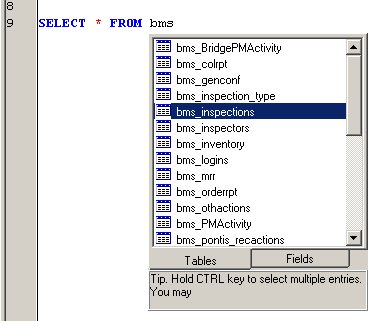
I've been using WinSQL for nearly 3 years now. A simple SQL GUI interface to any ODBC compliant database. Version 5.0 has some really cool features like the IntelliSense shown here:
Update: Now in version 5.5

Update: Now in version 5.5
Thursday, March 16, 2006
DeadLine - Curve Plotter, Expression Parser...

Solve equations, plot graphs free. DeadLine OnLine educational software
Ditto.
I tried my hand at something like this a long long time ago.
What surprises me is the fact that this baby's been developed using VB6!!
Friday, February 10, 2006
HTTP Debuggers
View incoming and outgoing HTTP traffic on your computer. Nice for debugging web applications.
Fiddler: By default handles IE traffic only. Needs some config to work with Firefox. This one's from Microsoft.
HTTP Debugger: Allows you to select a process for which HTTP traffic will be intercepted. As of now it crashes IE when you attach to it. Works fine with Firefox.
Fiddler: By default handles IE traffic only. Needs some config to work with Firefox. This one's from Microsoft.
HTTP Debugger: Allows you to select a process for which HTTP traffic will be intercepted. As of now it crashes IE when you attach to it. Works fine with Firefox.
Wednesday, December 28, 2005
XN Resource Editor
See XN Resource Editor.
A beautiful tool which lets you edit Win32 resources directly in the binary (exe,dll etc.). This one comes complete with editors for icons, cursors, dialogs and any other imaginable kind of resource. That's quite an achievement when you notice that Microsoft's Visual Studio does not support 32-bit icons/cursors even in the 2003 edition.

 Read more at www.wilsonc.demon.co.uk...
Tuesday, July 05, 2005
C/C++ Memory Leak Detection on Windows
Memory leak tracer by Jochen Kalmbach (http://blog.kalmbachnet.de/). You just need to include the files in your project and call his initialization, finalization routines. The output log gives you call stack, size of the request and believe it or not...source file and line number of the allocation request. Works with both malloc and new.
http://www.thecodeproject.com/tools/leakfinder.asp?print=true
And like all good things its free.
http://www.thecodeproject.com/tools/leakfinder.asp?print=true
And like all good things its free.
Thursday, February 24, 2005
Hernán Di Pietro's Message Cracker Wizard
Recently came across Hernán Di Pietro's Message Cracker Wizard. No more digging through windowsx.h to look for function signatures. You can also find it on code project. And here's his blog http://hernandp.blogspot.com/
For those who aren't familiar with message crackers here's a very very brief intro (for a better and more detailed article click here):
In most Win32 programs, the WndProc consists mainly of one huuuge switch-case. Each of the case statements looks something like:
To make sense of the message parameters, you need to do a LOWORD/HIWORD or use a bit mask as per the API docs. A message cracker is a pre-processor macro which converts the LPARAM and WPARAM to more sensible values and passes these values to a function which you provide. Each WM_ message has a corresponding HANDLE_WM_ macro defined in windowsx.h. Along with the macro you see a comment giving you the signature of the function you are expected to provide.
For example here is the entry for WM_SIZE as given in windowsx.h:
So to use the message cracker you change your
You then place all your message handling in
You can further reduce your coding effort using the
Note: For this to work, the parameters to your WndProc must be named
The advantages? 1) You don't need to remember whether your parameter was in the LOWORD or HIWORD or in the least significant byte. 2) The code is more modular. Each event is handled in a separate function. 3) Code is neat.
For those who aren't familiar with message crackers here's a very very brief intro (for a better and more detailed article click here):
In most Win32 programs, the WndProc consists mainly of one huuuge switch-case. Each of the case statements looks something like:
   case WM_SIZE:
       int width = LOWORD(lParam), height = HIWORD(lParam);
       RedoLayout(width, height);
       // et cetera ...
       return 0;
To make sense of the message parameters, you need to do a LOWORD/HIWORD or use a bit mask as per the API docs. A message cracker is a pre-processor macro which converts the LPARAM and WPARAM to more sensible values and passes these values to a function which you provide. Each WM_ message has a corresponding HANDLE_WM_ macro defined in windowsx.h. Along with the macro you see a comment giving you the signature of the function you are expected to provide.
For example here is the entry for WM_SIZE as given in windowsx.h:
/* void Cls_OnSize(HWND hwnd, UINT state, int cx, int cy) */
#define HANDLE_WM_SIZE(hwnd, wParam, lParam, fn)     ((fn)((hwnd), (UINT)(wParam), (int)(short)LOWORD(lParam), (int)(short)HIWORD(lParam)), 0L)
So to use the message cracker you change your
case to:case WM_SIZE:
return HANDLE_WM_SIZE(hwnd, wParam, lParam, myWindow_OnSize);
You then place all your message handling in
myWindow_OnSize as in:void mainWindow_OnSize(HWND hwnd, UINT state, int cx, int cy){
RedoLayout(cx, cy);
}You can further reduce your coding effort using the
HANDLE_MSG macro. For this, you replace the entire case block with:HANDLE_MSG(hwnd, WM_SIZE, mainWindiow_OnSize)Note: For this to work, the parameters to your WndProc must be named
wParam and lParam.The advantages? 1) You don't need to remember whether your parameter was in the LOWORD or HIWORD or in the least significant byte. 2) The code is more modular. Each event is handled in a separate function. 3) Code is neat.
Subscribe to:
Posts (Atom)
About Me

- Agnel CJ Kurian
- C/C++ Programmer doing CAD on Windows. Some web development experience. Bangalorean.